
Docker - Terminal commands
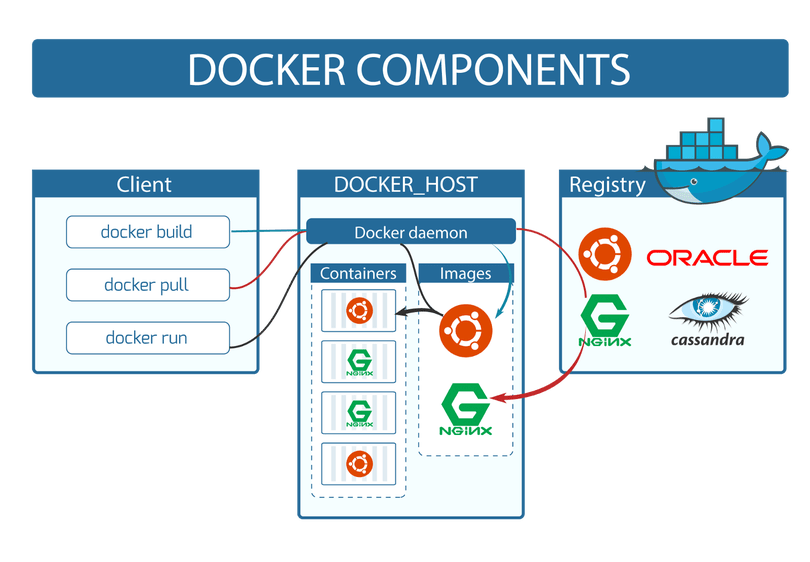
Docker provides numerous commands for managing and running containers. Below are all the essential Docker commands and their functions.
Docker Management Commands
- docker --version: Shows the Docker version.
- docker info: Provides general information about Docker.
- docker login: Allows logging into Docker Hub.
Docker Image Commands
- docker pull : Downloads the specified image from Docker Hub.
- docker build -t .: Builds a Docker image from the current directory.
- docker images: Lists local Docker images.
- docker rmi : Deletes the specified image.
Docker Container Commands
- docker run : Runs the specified image.
- docker run -d : Runs the container in the background.
- docker run -it /bin/bash: Opens a terminal in the container.
- docker ps: Lists currently running containers.
- docker ps -a: Lists all containers.
- docker stop : Stops the specified container.
- docker start : Starts the specified container.
- docker restart : Restarts the specified container.
- docker rm : Deletes the specified container.
- docker logs : Shows logs for the specified container.
- docker exec -it /bin/bash: Attaches to a running container and opens a terminal.
Docker Volume Commands
- docker volume create : Creates a new volume.
- docker volume ls: Lists all volumes.
- docker volume inspect : Provides information about the specified volume.
- docker volume rm : Deletes the specified volume.
Docker Network Commands
- docker network create : Creates a new network.
- docker network ls: Lists all networks.
- docker network inspect : Provides information about the specified network.
- docker network rm : Deletes the specified network.
Docker Compose Commands
- docker-compose up: Starts all services defined in Docker Compose.
- docker-compose down: Stops and removes all services defined in Docker Compose.
- docker-compose build: Builds images for services defined in Docker Compose.
- docker-compose logs: Shows logs for Docker Compose services.
- docker-compose ps: Lists Docker Compose services.
Docker Image Commands (Additional)
- docker search : Searches for images on Docker Hub.
- docker tag : Tags an image with a new name.
- docker save -o : Saves an image as a file.
- docker load -i : Loads an image from a file.
- docker history : Shows the history of an image.
- docker inspect : Provides detailed information about an image.
Docker Container Commands (Additional)
- docker create : Creates a new container but does not start it.
- docker attach : Attaches to a running container.
- docker commit : Saves changes made in a container as a new image.
- docker cp : : Copies a file or directory from a container to the host machine.
- docker diff : Shows changes made to a container.
- docker export -o : Exports a container as a file.
- docker import : Creates a new image from a file.
- docker kill : Immediately stops a container.
- docker pause : Pauses all processes in a container.
- docker unpause : Unpauses all processes in a container.
- docker rename : Renames a container.
- docker update --cpus= --memory=: Updates a container's resources.
Docker Network Commands (Additional)
- docker network connect : Connects a container to an existing network.
- docker network disconnect : Disconnects a container from an existing network.
- docker network prune: Deletes all unused networks.
Docker Volume Commands (Additional)
- docker volume prune: Deletes all unused volumes.
Docker System Commands
- docker system df: Shows disk usage information.
- docker system prune: Deletes all unused objects (containers, images, networks, etc.).
Docker Event Commands
- docker events: Allows monitoring Docker events (container creation, deletion, etc.).
Docker Swarm and Orchestration Commands
- docker swarm init: Initializes Docker Swarm mode.
- docker swarm join: Joins an existing Swarm mode.
- docker node ls: Lists all nodes in Swarm mode.
- docker service create --name : Creates a new service.
- docker service ls: Lists all services.
- docker service ps : Lists tasks for a service.
- docker service scale =: Scales the replicas of a service.
- docker stack deploy -c : Deploys a stack using a Docker Compose file.
- docker stack ls: Lists all stacks.
- docker stack ps : Lists tasks for a stack.
- docker stack services : Lists services in a stack.
- docker stack rm : Deletes a stack.
Recent Posts


Artificial Intelligence: The Technology of the Fut...
22.10.2024 23:17
